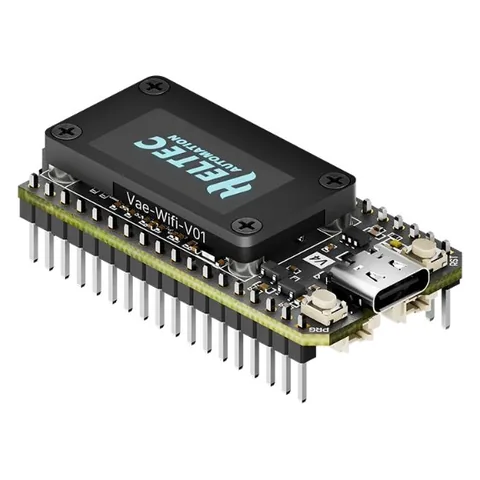
BoxOnPost for the Heltec V4
BoxOnPost pages on the radio's screen · holds 100 messages.
BoxOnPost v0.7.3 includes MeshCore 1.18.0. Installing it replaces the firmware on your radio with this version.
Brand-new radio, or coming from Meshtastic?
No need to install anything else first. Click Flash below and tick “Erase device” when it asks: you get a clean BoxOnPost install with MeshCore built in. Then pair it with the free MeshCore app.
Already on MeshCore or BoxOnPost? Leave “Erase device” unticked and your identity, contacts and settings are kept.
Brand-new radio, or not running MeshCore yet?
Radios often arrive with other firmware (such as Meshtastic) or a factory test program. Before installing BoxOnPost, first install the official MeshCore Companion firmware for your radio from flasher.meshcore.io, connect it to the MeshCore app and make sure it works. Then come back here.
Already on MeshCore? Any recent version is fine: BoxOnPost v0.7.3 replaces it with MeshCore 1.18.0 plus the BoxOnPost features. If your radio runs a MeshCore version newer than 1.18.0, do the backup below before installing.
Back up your private key
Installing keeps your identity, contacts and settings. The backup is a safety net in case something goes wrong.
In the MeshCore app, open Settings and choose Export private key. Keep it somewhere private, like a password manager, and never share it. Also screenshot your radio settings and note any private channels. Full backup steps.
Flash it from your browser
Pick your version first.
TESTED This version has been run on real radios.
Plug the radio into this computer with a USB data cable first. Works in Chrome or Edge on Windows, Mac, Linux and Chromebook.
Using a USB cable instead of Bluetooth?
Only if the radio stays plugged into a computer (bots, desktop use). This version has no Bluetooth. Powering the radio from a USB charger does not need it.
Prefer to download the file?
heltec_v4_companion_radio_ble-v1.18.0-BOP-0.7.3-UPDATE.bin
The Bluetooth version, for the phone app. It's an UPDATE file: it replaces the firmware and keeps your identity, contacts and settings. Install it at flasher.meshcore.io → Custom Firmware, with “Erase device” unticked.
TESTED This version has been run on real radios.
Plug the radio into this computer with a USB data cable first. Works in Chrome or Edge on Windows, Mac, Linux and Chromebook.
Using a USB cable instead of Bluetooth?
Only if the radio stays plugged into a computer (bots, desktop use). This version has no Bluetooth. Powering the radio from a USB charger does not need it.
Prefer to download the file?
heltec_v4_r8_companion_radio_ble-v1.18.0-BOP-0.7.3-UPDATE.bin
The Bluetooth version, for the phone app. It's an UPDATE file: it replaces the firmware and keeps your identity, contacts and settings. Install it at flasher.meshcore.io → Custom Firmware, with “Erase device” unticked.
TESTED This version has been run on real radios.
Plug the radio into this computer with a USB data cable first. Works in Chrome or Edge on Windows, Mac, Linux and Chromebook.
Using a USB cable instead of Bluetooth?
Only if the radio stays plugged into a computer (bots, desktop use). This version has no Bluetooth. Powering the radio from a USB charger does not need it.
Prefer to download the file?
heltec_v4_tft_companion_radio_ble-v1.18.0-BOP-0.7.3-UPDATE.bin
The Bluetooth version, for the phone app. It's an UPDATE file: it replaces the firmware and keeps your identity, contacts and settings. Install it at flasher.meshcore.io → Custom Firmware, with “Erase device” unticked.
This version is being tested on real radios. The download appears here once it passes.
Want to help test it? Get in touch
What happens when you click Flash
- Click the Flash button above and pick your radio's port in the pop-up (it may be named USB JTAG, CP210x or similar).
- Already on MeshCore or BoxOnPost? When it asks “Erase device?”, leave it unticked. That keeps your identity, contacts and settings.
- Brand-new or wiped radio? Tick “Erase device” for a clean start.
- Wait about a minute while it installs. Keep the cable plugged in.
- When it says the install is complete, press the RST button once (or unplug the radio and plug it back in). Heltec radios sometimes stay in install mode until you do. If the screen still stays blank, run Flash again with “Erase device” ticked.
Nothing happens when you click? You need Chrome or Edge on a computer; Safari, Firefox and phones can't talk to USB devices. Or use the download option above.
Check it worked
Reconnect the MeshCore app. In Settings the version reads v1.18.0-BOP-0.7.3, and your contacts are still there.
Try it
- Find the new pages. Short-press the button to move through the pages. After “Recent adverts” come MAILBOX, LAST TRIES, SEND NOW, CLEAR MAILBOX, HOLD MESSAGES and SIGNAL. A long press (about 1 second) uses the page you're on.
- Hold a message. Send a direct message to a radio that's switched off. The app says “failed”, but MAILBOX on your radio shows Held: 1.
- Watch it deliver. Switch the other radio back on. Within about 15 minutes (or straight away if you long-press SEND NOW) it gets the message and your screen shows Delivered.
The Guide explains every page.
Good to know
- V4 or V4 R8? They're wired differently, so the files don't swap. Look for “R8” on the board or box.
- Touch screen: tap the right half or swipe left for the next page, tap the left half or swipe right to go back, and hold your finger still for about a second to use the page. The PRG button still works too. The V4 touch screen is tested; the V4 R8 touch screen is still being tested.
- Works on both the V4.2 and V4.3: the firmware detects which radio amplifier your board has.
- V4 R8: holds 50 messages instead of 100, because the R8 has less memory.
- Optional knob: the small-screen versions also work with a rotary knob (KY-040) for faster page turning. How to wire one.
Help us test
These versions: V4 R8, touch screen. The build compiles and passes every mailbox test, but nobody has run it on a real radio yet. If you try it, please tell us what worked and send photos of anything odd. That's how it gets the Tested badge.
Something went wrong?
Won't start after installing? Install the official MeshCore Companion firmware for your radio from flasher.meshcore.io (pick your radio from the list), then install the BoxOnPost file again with “Erase device” unticked. If you had to erase, import your private key to get your identity back.
Going back to official MeshCore: in the flasher, pick your radio, choose Companion Bluetooth, version 1.18.0, and flash with “Erase device” unticked. Your identity and contacts are kept, and if you come back to BoxOnPost later your held messages are still there.